
Charting a course
After moving cross country and starting a new job, I’ve finally settled down enough to make some more progress on my python simulations (thanks to having a long weekend without traveling). I’m moving on to setting up a Python lander simulation with some Martian terrain. I’d like to mess around with some different obstacle avoidance techniques, and re-create some of my Q learning results or implement some other RL agents eventually.
Setting up the orbit sim with scipy.integrate was helpful – the dynamics I’m using for landing are simpler (uniform gravity field in some Mars-fixed frame that is assumed to be inertial, which isn’t quite accurate but good enough for now), and thus were easier to re-implement.
Cartography
The trickier part has been building a new terrain map. My familiarity with MATLAB after years of undergrad and grad school made it easy to manipulate Mars HiRISE shaded relief images into rough elevation maps, but Python remains a slightly less familiar beast. I’m trying to make this map more representative of the surface, and much larger as well.
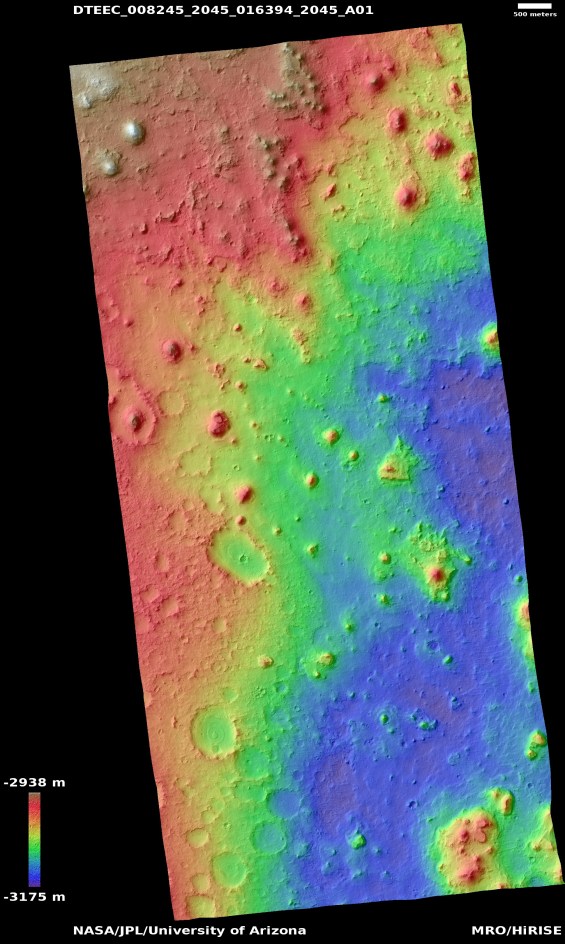
I started with Image 1, which provides a nice scale showing the altitude variation and length to pixel ratio. I cropped out a more square-ish section from around the middle of the image, and used Pillow to bring it into Python. Since this is an RGBA image, the read in image is a ~1200x1200x4 array, rather than a simple 1200×1200 array. RGBA images have 4 channels, but I would prefer one channel so I can make a simple linear mapping between color and height. Mapping a 4-tuple color to a one dimensional height is unnecessarily tricky. It is common in the vision world to convert images to grayscale before doing more complicated operations on them (openCV does this), so that’s what I will do (totally unrelated joke – why did the aerospace engineer cross the road? because that’s what the table in the back of SMAD told them to do).

Image 2 shows the cutout after it has been converted into a single channel grayscale image. Of course, going from 4 channels to 1 does imply a loss of information. I am still OK with approximating things for this map; the main improvement I wanted was a larger size while keeping track of meter lengths and altitude. I took this grayscale image and converted the pixel values (which ranged from 0-1) into altitudes by scaling them to 0-237 m (the range in the colorbar in Image 1). Each pixel in Image 2 is also 3.7 meters in surface length (from the scale bar in Image 1). I haven’t done anything with the meters/pixel ratio yet, I’ll probably use it when evaluating landing areas or something later. Anyways – after multiplying the grayscale intensity by the height scale factor, I saved the resulting ~1200×1200 array as my height map.

Plotting the height map using matplotlib’s 3d axes gives us Image 3. It isn’t half bad to be honest. I now have a much bigger map than I did before, and there’s some more varied terrain to boot. I have of course lost a good amount of granularity and smoothness information by using a single image and converting to grayscale. Stereo rectification would probably yield a much better result (there may be a blog post on a project I did with Mars Global Surveyor image rectification sometime in the future), but once again, I’m pretty happy with this for now. Especially considering I had nothing in Python to begin with.
The one thing I am a bit frustrated with is 3d plotting and manipulation with matplotlib. Panning on a 3d figure is horrendously slow, as is any other form of interacting with a 3d figure. Even getting the right perspective for a trajectory to show up well was a hassle. My attempts to install another, higher powered visualization tool (mayaVI) failed. Something about my combo of Python 3.6 and Mojave is making mayaVI’s pip install very unhappy. Even googling wasn’t too helpful, since I’d really prefer a more out-of-the-box solution that doesn’t involve building things from source. I will definitely miss MATLAB’s 3d figure manipulation.
Plotting woes aside, I’m pretty happy with this map, and am hopeful that it’ll provide me with a good sandbox to mess around with landing control and dynamics. I’ll try to have some trajectories on this map for next time; ’till then, happy holidays!
 Roshan Radhakrishnan
Leave a comment